Every business has a few workloads it simply cannot afford to lose: the billing system, the customer database, the order platform, the apps that run daily operations. If one of these goes down or gets compromised, the damage shows up in revenue, reputation, and customer trust within hours.
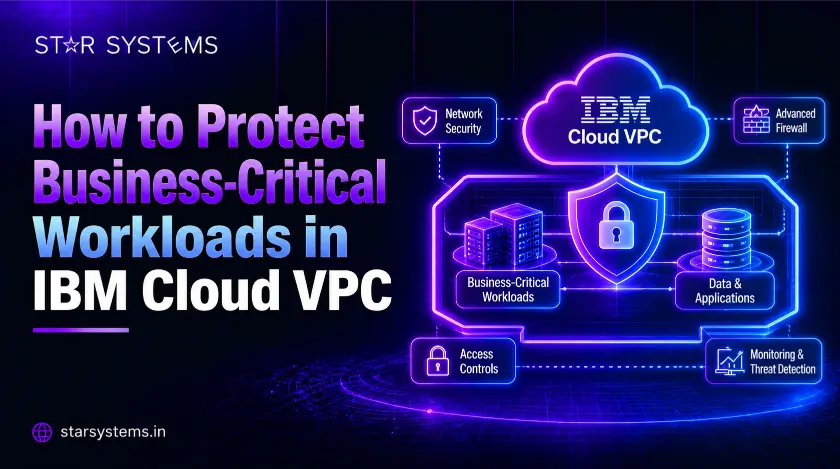
That is why many organizations are building these workloads on IBM Cloud VPC. A Virtual Private Cloud gives you an isolated, software-defined network inside the public cloud, with control over who connects, what traffic flows, and where your data lives. But the platform alone does not guarantee protection. How you design and run it decides whether your critical workloads stay safe.
Here is a practical guide to protecting business-critical workloads in IBM Cloud VPC.
Why IBM Cloud VPC Suits Critical Workloads
IBM Cloud VPC lets you carve out your own private network, define subnets, and spread resources across multiple zones within a region. You decide the IP ranges, the routing, and the access rules. This isolation is the base layer of security, because your workloads are not exposed to the public internet unless you choose to expose them.
Compared with older environments, VPC also brings modern networking controls and a cleaner way to apply security consistently. That is a big reason why teams running on IBM Cloud Classic Infrastructure Services are now planning a move to VPC.
1. Design a Secure Network from Day One
Start by dividing your network into layers. Keep public-facing components, application servers, and databases in separate subnets, so a problem in one layer does not spread to the others.
Use security groups as virtual firewalls at the instance level and network ACLs to control traffic at the subnet level. Follow a simple rule: deny everything by default, then allow only the traffic each workload truly needs. Avoid opening ports to the entire internet just for convenience.
For connections to your office or data center, use a VPN or a private connectivity option instead of sending traffic over the public internet.
2. Control Access with Strong Identity Management
Most breaches begin with weak or excessive access. IBM Cloud Identity and Access Management (IAM) lets you assign permissions by role and resource.
- Give each person and service only the access required.
- Turn on multi-factor authentication for all users.
- Use service IDs for applications instead of shared credentials.
- Review access policies every quarter and remove unused accounts.
Critical workloads deserve stricter rules than test environments, so separate them into different resource groups with tighter permissions.
3. Encrypt Everything, and Own Your Keys
Encryption should cover data at rest and in transit. In IBM Cloud Infrastructure, you can use key management services to create, store, and rotate your own encryption keys, which gives you control over who can decrypt your data.
For industries with strict compliance needs, such as banking or healthcare, keeping control of your keys is often a requirement, not just a good habit. Rotate keys on a schedule and restrict who can manage them.
4. Build for High Availability Across Zones
A workload is only protected if it keeps running when something fails. IBM Cloud VPC regions contain multiple availability zones, so you can place instances in different zones and put a load balancer in front of them.
If one zone has a problem, traffic shifts to the healthy one and users barely notice. For databases, set up replication across zones so you always have an up-to-date copy ready.
5. Back Up Data and Test Your Recovery
Backups are your last line of defense against deletion, corruption, and ransomware. Schedule regular backups for block storage volumes, keep copies in a separate location, and define your recovery goals clearly:
- RTO (Recovery Time Objective): How long you can be down.
- RPO (Recovery Point Objective): How much data you can afford to lose.
Then test restoration at least twice a year. A backup that has never been restored is only an assumption.
6. Monitor, Log, and Respond Quickly
You cannot protect what you cannot see. Turn on flow logs, activity tracking, and performance monitoring so you know who did what, and when. Set alerts for unusual behavior such as login attempts from new locations, sudden traffic spikes, or changes to security rules.
Keep alerts meaningful. If everything triggers a notification, your team will stop paying attention. Focus on alerts that need action, and keep logs long enough to support investigations and audits.
7. Secure Containerized Workloads with IBM Cloud Kubernetes
Many critical applications now run in containers. IBM Cloud Kubernetes services make it easier to deploy and scale them inside your VPC, but containers need their own protection.
- Scan container images for vulnerabilities before deployment.
- Use network policies to control traffic between pods.
- Apply role-based access control to the cluster.
- Keep Kubernetes versions and worker nodes patched.
- Store secrets in a secure vault, not in application code.
Running clusters across multiple zones also improves resilience, so one zone failure does not take down your application.
8. Plan the IBM Classic to VPC Move Carefully
If your workloads still run on classic infrastructure, IBM Classic to VPC migration is a smart step toward better security, flexibility, and modern networking. But critical workloads should never be moved in a rush.
A safe approach looks like this:
- Assess your current environment and map all dependencies.
- Classify workloads by business importance.
- Start with low-risk workloads to validate the process.
- Move critical systems in planned windows, with a rollback plan ready.
- Test performance, security, and connectivity after each phase.
Skipping the planning phase is the most common reason migrations cause downtime. Good preparation keeps your critical applications available throughout the transition.
9. Keep Costs and Configurations Under Control
Security and cost are connected. Unused resources, forgotten test servers, and misconfigured rules all increase both risk and spending. Tag every resource, review configurations regularly, and remove what you no longer need. A clean, well-documented environment is easier to protect.
Why Choose Star Systems to Protect Your IBM Cloud VPC Workloads
Designing, migrating, and securing critical workloads takes experience, especially when the business cannot afford downtime. Star Systems works with organizations that run and plan to run on IBM Cloud, helping them build secure, resilient environments from the start.
Here is how we can support you:
Conclusion
Protecting business-critical workloads is not about a single tool. It is about layers: a well-designed network, tight access control, strong encryption, high availability, tested backups, and constant monitoring. IBM Cloud VPC gives you the foundation, and the right practices turn that foundation into real protection.
If you are planning your move from classic or want to strengthen your current setup, start with a clear assessment and build from there. Talk to our IBM Cloud experts and keep your critical workloads safe, available, and ready to grow.